
Video, AI & sound · 2026
Schiller’s “Song of the Bell” in three minutes
In German class we had to recite a poem and set it to images and music. My father suggested Friedrich Schiller’s “Song of the Bell” — a genuine classic of nineteen stanzas, which I had to compress down to its emotional core.
- Brief
- Poetry recital with video and sound, German class
- My role
- Text analysis, storyboard, prompting, narration and editing
- Timeframe
- School project, spring 2026
- Tools
- Obsidian, Gemini Omni Flow, Gemini Lyra, Shotcut
01
The brief
The point of the project wasn’t simply to recite a poem from memory, but to create a real audiovisual atmosphere. The hard part was length: Schiller’s “Song of the Bell” runs to nineteen stanzas, while our video was capped at exactly three minutes.
So I had to find a way to cut and condense the work while keeping its message and its strong imagery intact — without the story feeling chopped up or unfinished.
02
What I worked through first
To get a feel for the structure, I printed the poem out on paper first. Then I brought some system to it with highlighters: everything that should happen visually in the video went blue, every sound or music cue went yellow. My first notes went in the margins.
To stop all that paper turning into chaos, I opened my laptop and moved every marked line and every thought into Obsidian. That made it far easier to shuffle the structure around and work out the three-minute core.
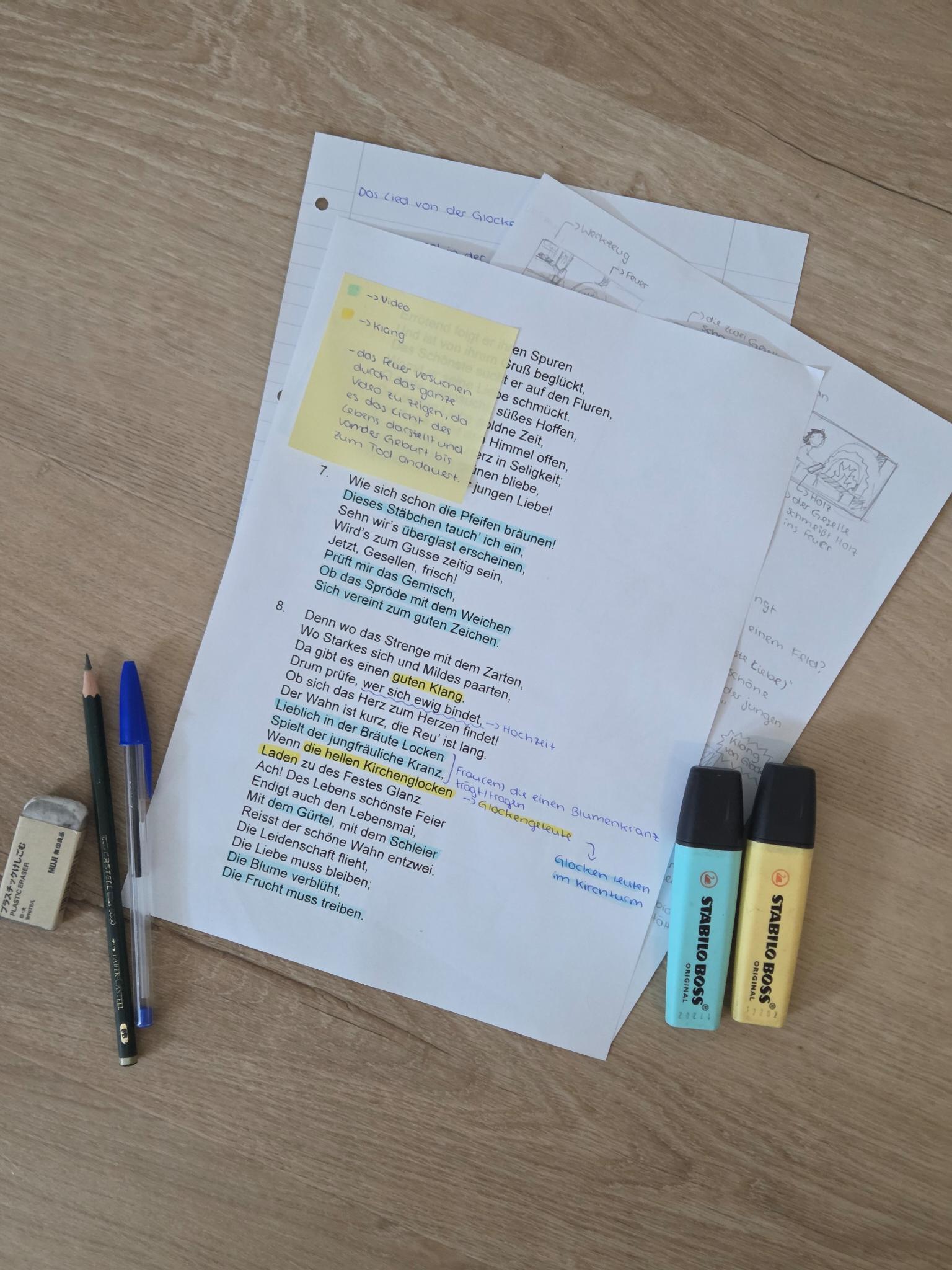
It became clear quickly: if you compress nineteen stanzas into three minutes, every image sequence has to land precisely and set a mood immediately.
03
Storyboard and visual language
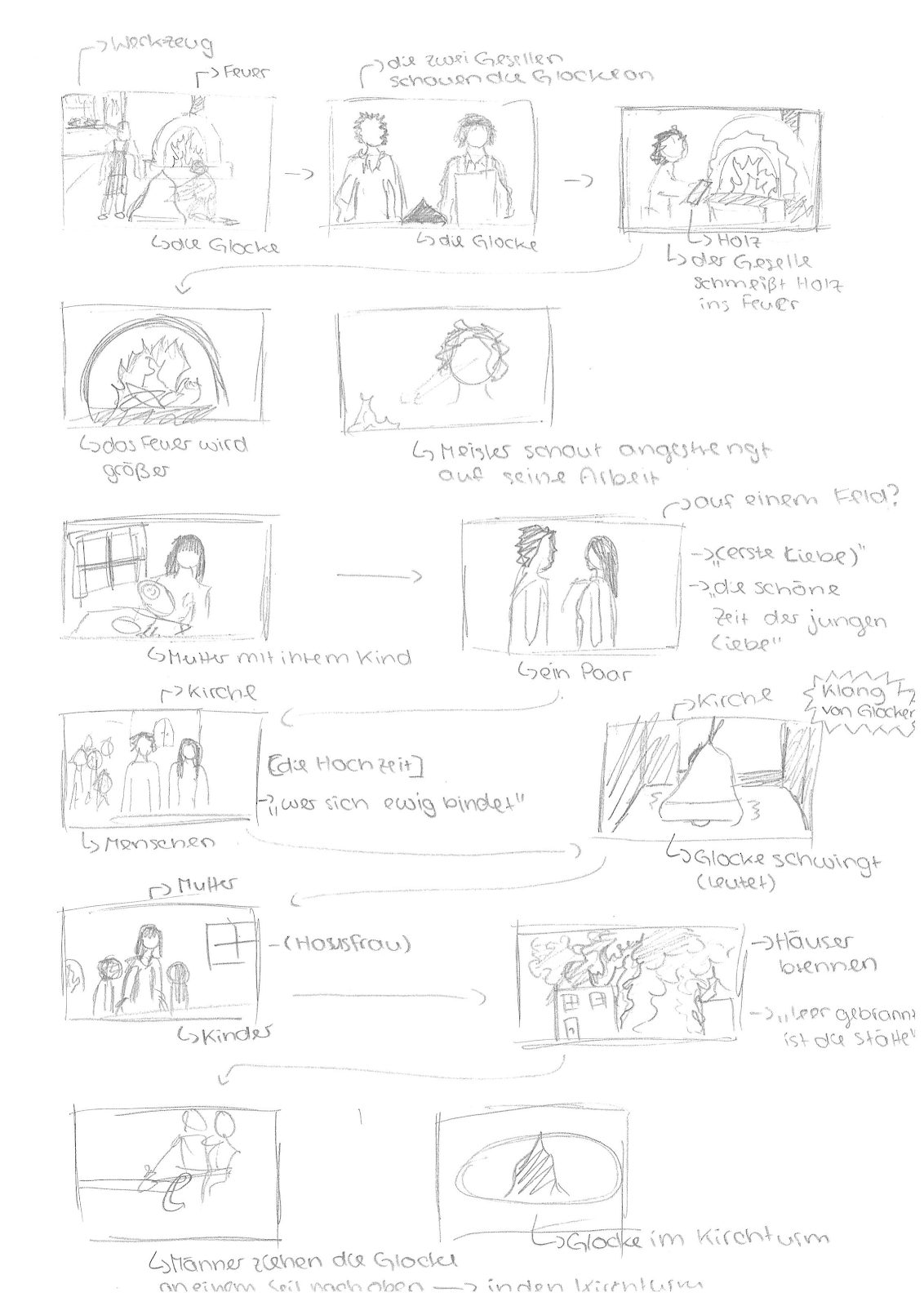
Before writing a single AI prompt, I wanted to know exactly how the sequence would work visually. So I took everything I had gathered in Obsidian and drew my own storyboard by hand.
The storyboard was my thread through the piece: from the journeymen at the fire to the church bells to the dramatic house fires, I could test whether the transitions between scenes felt logical and dynamic even without words.
04
Decisions during production
For the technical side I settled on a clear, structured workflow, so that images, narration and sound would fit together in the edit:
- Detailed prompts for every scene, written in Obsidian. Before starting Gemini Omni Flow I drafted a precise prompt for each individual scene and camera angle and saved it straight into my project folder.
- A fixed eight-second beat in Gemini Omni Flow. To keep the pacing calm and even, I locked every generated clip to exactly eight seconds, without exception.
- Purpose-made AI sound with Gemini Lyra. Rather than using ready-made stock music, I prompted the background score myself to match the drama of each section and had Gemini Lyra generate it.
- My own narration, recorded section by section. I read the shortened poem myself. To stay flexible in the edit, I recorded each stanza separately and saved it as an M4A file.
05
The result
Once I had all the image sequences, soundtracks and M4A voice files together, I brought everything into the editor Shotcut. It took a fair amount of fine-tuning before the rhythm of my voice lined up exactly with the eight-second clips and the music from Gemini Lyra.
06
What I would do differently
Looking at the finished video today, one thing bothers me visually: the characters, especially the master and the journeymen, change slightly in appearance from scene to scene.
It was only after handing it in that I learned you can define characters permanently in Gemini Omni Flow and reference them with a simple @ in the prompt. Next time I would use that from the start, so the people look exactly the same across all three minutes.